지난 글에서 글쓰기 로직을 작성하였는데
😭
사실 지금 아무것도 입력하지 않은 Null값을 전송해도 error가 안난다
유효성 체크 로직을 추가하지 않았기 때문!
@Valid를 이용해 글쓰기에서 유효성 체크를 실행해보자
🥑ABoardcado🥑
Validation 사용하기
✅ [ Build.gradle ] dependencies 추가
💡
implementation 'org.springframework.boot:spring-boot-starter-validation’
👩🏻💻 코딩 시작
1. BoardDto
package com.rim.aboardcado.dto;

import com.rim.aboardcado.domain.entity.Board;
import lombok.*;
import org.hibernate.validator.constraints.Length;

import javax.validation.constraints.NotEmpty;
import java.time.LocalDateTime;

@Builder
@Getter
@ToString
public class BoardDto {

    private Long id;

    @NotEmpty(message = "작성자 입력은 필수입니다.")
    @Length(max = 10, message = "10자 이하만 가능합니다.")
    private String author;

    @NotEmpty(message = "제목 입력은 필수입니다.")
		@Length(max = 20, message = "20자 이하만 가능합니다.")
    private String title;

    @NotEmpty(message = "내용 입력은 필수입니다.")
    private String content;

    private LocalDateTime createdDate;
    private LocalDateTime modifiedDate;

}
✅ @NotEmpty
- NotNull의 개념과 비슷, 빈 칸이면 안되지만 공백을 체크하지 않는다
- 빈칸+공백까지 체크하는 건 @NotBlank
✅ @Length
- 길이에 관한 속성
- min, max 값 설정 가능
✅ message
- 해당 @조건이 지켜지지 않았을 때 전달될 메세지
- 아래 설정들에 의해 view에 띄워진다
2. BoardController
✅ @Valid 추가하여 유효성 체크
// 글쓰기
@GetMapping("/post")
public String post(BoardDto boardDto, Model model) {
    model.addAttribute("board", boardDto);

    return "board/post";
}

@PostMapping("/post")
public String write(@Valid BoardDto boardDto, BindingResult bindingResult, Model model) {

		if (bindingResult.hasErrors()) {
        return "board/post";
    }
    try {
        boardService.savePost(boardDto);

    } catch (IllegalStateException e) {
        model.addAttribute("errorMessage", e.getMessage());
        return "board/post";
    }

    return "redirect:/";
}
✅ bindingResult 는 애초에 오류전달 목적이기 때문에 자동보내짐
model에 안담아도 된다!!
주의할 점은 ❗
✅ 체크할 대상 바로 뒤에 와야함
3. post.html
👈👈 전문 보기
<!DOCTYPE html>
<html xmlns:th="http://www.thymeleaf.org"
      xmlns:layout="http://www.ultraq.net.nz/thymeleaf/layout"
      layout:decorate="~{layout/layout}">

<!-- valid 체크 CSS 추가 -->
<th:block layout:fragment="css">
    <style>
        .fieldError {
            color: #bd2130;
        }
    </style>
</th:block>

<!-- valid 체크 스크립트 추가 -->
<th:block layout:fragment="script">

    <script th:inline="javascript">
        $(document).ready(function(){
            var errorMessage = [[${errorMessage}]];
            if(errorMessage != null){
                alert(errorMessage);
            }
        });
    </script>
</th:block>

<div layout:fragment="content">
    <div class="container">
        <form action="/post" method="post" th:object="${boardDto}">
            <div class="form-group row">
                <label for="inputTitle" class="col-sm-2 col-form-label"><strong>제목</strong></label>
                <div class="col-sm-10">
                    <input type="text"  th:field="*{title}" name="title" class="form-control" id="inputTitle" />
                    <p th:if="${#fields.hasErrors('title')}" th:errors="*{title}" class="fieldError">Incorrect data</p>

                </div>
            </div>
            <div class="form-group row">
                <label for="inputAuthor" class="col-sm-2 col-form-label"><strong>작성자</strong></label>
                <div class="col-sm-10">
                    <input type="text" th:field="*{author}" name="author" class="form-control" id="inputAuthor" />
                    <p th:if="${#fields.hasErrors('author')}" th:errors="*{author}" class="fieldError">Incorrect data</p>

                </div>
            </div>
            <div class="form-group row">
                <label for="inputContent" class="col-sm-2 col-form-label"><strong>내용</strong></label>
                <div class="col-sm-10">
                    <textarea type="text" th:field="*{content}" name="content" class="form-control" id="inputContent"></textarea>
                    <p th:if="${#fields.hasErrors('content')}" th:errors="*{content}" class="fieldError">Incorrect data</p>
                </div>
            </div>
            <div class="row">
                <div class="col-auto mr-auto"></div>
                <div class="col-auto">
                    <input class="btn btn-success" type="submit" role="button" value="글쓰기" />
										<input type="hidden" th:name="${_csrf.parameterName}" th:value="${_csrf.token}">
                    <a class="btn btn-danger" th:href="@{'/'}" role="button">취소</a>
                </div>
            </div>
        </form>
    </div>
</div>
</html>
✅ @Valid유효성 체크 실패 시 errorMessage css ,script 추가 부분
<!-- valid 체크 CSS 추가 -->
<th:block layout:fragment="css">
    <style>
        .fieldError {
            color: #b73a3a;
        }
    </style>
</th:block>

<!-- valid 체크 스크립트 추가 -->
<th:block layout:fragment="script">

    <script th:inline="javascript">
        $(document).ready(function(){
            var errorMessage = [   [${errorMessage}]    ];
            if(errorMessage != null){
                alert(errorMessage);
            }
        });
    </script>
</th:block>
✅ @Valid유효성 체크 실패 시 팝업 message 추가 부분
<form action="/post" method="post" th:object="${board}">
            <div class="form-group row">
                <label for="inputTitle" class="col-sm-2 col-form-label"><strong>제목</strong></label>
                <div class="col-sm-10">
                    <input type="text"  th:field="*{title}" name="title" class="form-control" id="inputTitle" />
                    <p th:if="${#fields.hasErrors('title')}" th:errors="*{title}" class="fieldError">Incorrect data</p>

                </div>
            </div>
            <div class="form-group row">
                <label for="inputAuthor" class="col-sm-2 col-form-label"><strong>작성자</strong></label>
                <div class="col-sm-10">
                    <input type="text" th:field="*{author}" name="author" class="form-control" id="inputAuthor" />
                    <p th:if="${#fields.hasErrors('author')}" th:errors="*{author}" class="fieldError">Incorrect data</p>

                </div>
            </div>
            <div class="form-group row">
                <label for="inputContent" class="col-sm-2 col-form-label"><strong>내용</strong></label>
                <div class="col-sm-10">
                    <textarea type="text" th:field="*{content}" name="content" class="form-control" id="inputContent"></textarea>
                    <p th:if="${#fields.hasErrors('content')}" th:errors="*{content}" class="fieldError">Incorrect data</p>
                </div>
            </div>
            ...
						<input type="hidden" th:name="${_csrf.parameterName}"
																	th:value="${_csrf.token}">
        </form>
✅ th:object="${boardDto}"
model.addAttribute("boardDto", boardDto);에 담은 값들을이 아닌boardDto.titletitle로 사용하게 오브젝트를 적어놓는다
✅ th:field="*{title}"
- 사용자 입력 값 유지
- 타임리프의 th:field 는 매우 똑똑하게 동작하는데, 정상 상황에는 모델 객체의 값을 사용하지만, 오류가 발생하면 FieldError 에서 보관한 값을 사용해서 값을 출력한다.
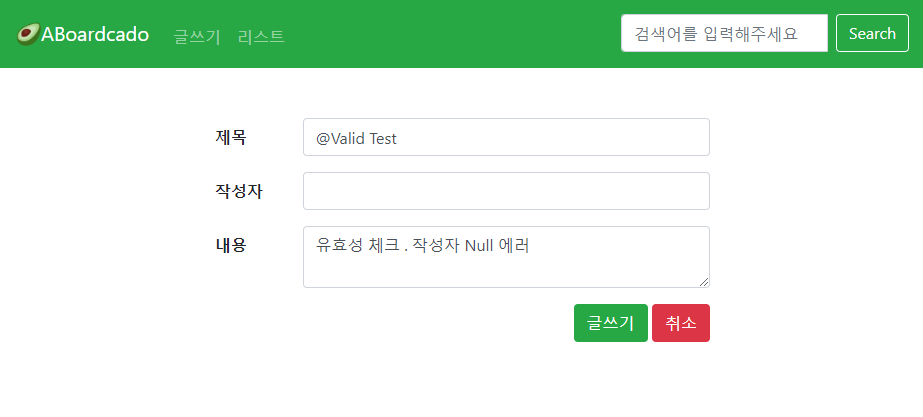
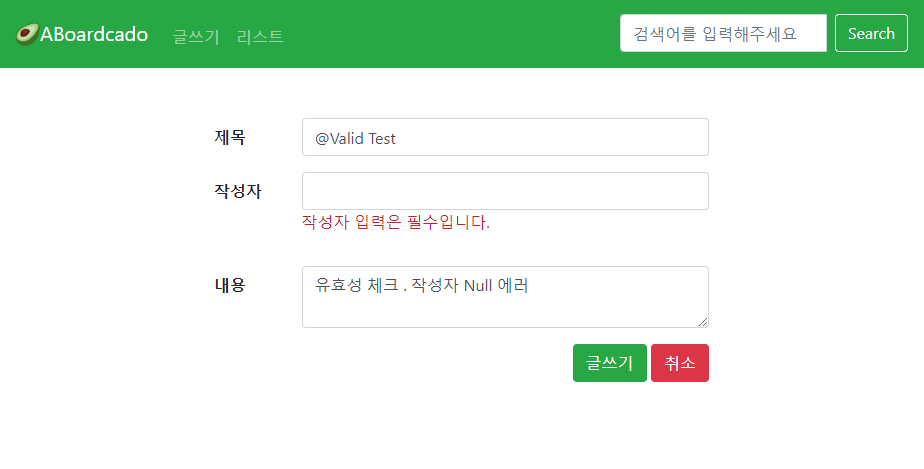
즉, title 만 오류고 author, content 필드가 정상일 경우
title에는 해당 필드의 errorMessage를 출력하고
author, content에는 이전에 입력했던 값들이 유지된다 (중요 😭)
✅ th:if="${#fields.hasErrors('title')}
- title 검증에 오류가 있을때만 출력
✅ th:errors="*{title}"
- 타임리프 화면을 렌더링 할 때 th:errors 가 실행된다.만약 이때 오류가 있다면 생성된 오류 메시지 코드를 순서대로 돌아가면서 메시지를 찾는다.
- title에 설정해둔 메세지를 기억하자
- @NotEmpty(message = "제목 입력은 필수입니다.") @Length(max = 20, message = "20자 이하만 가능합니다.") private String title;
- 없으면 디폴트 메시지를 출력한다.
다음편에서는 List 고고~
그럼 이만 👋
'Project > 🥑JPA + SpringSecurity 게시판' 카테고리의 다른 글
| [JPA + SpringSecurity 게시판] #7 글 상세보기 (0) | 2022.05.02 |
|---|---|
| [JPA + SpringSecurity 게시판] #6 글 리스트 만들기 (0) | 2022.04.24 |
| [JPA + SpringSecurity 게시판] #4 글쓰기 만들기 (0) | 2022.04.12 |
| [JPA + SpringSecurity 게시판] #3 DB연동 (MySQL) (0) | 2022.04.07 |
| [JPA + SpringSecurity 게시판] #2 프로젝트 생성 (0) | 2022.03.28 |


