지난글에서 📋List 출력까지 성공!
이번에는 List에서 글 제목을 클릭하면 해당 글 상세보기를 구현해보자 🔥
코딩시작 👩🏻💻
기존 class에 코드를 추가
✅ id 값을 이용해서 post의 detail을 불러오는 postDtl() 생성
1. Service
[ BoardService ]
@Transactional
    public Board postDtl(Long id) {
        Board board = boardRepository.findById(id)
                .orElseThrow(()-> {
                    return new IllegalArgumentException("글을 찾을 수 없습니다");
                });
        return board;
    }
✅ check ✅
findById(id)
- JPA에서는 메소드() 이름을 해석해 JPQL을 생성한다
- Java Persistence Query Language
- ‘ By ‘ 를 기준으로 Where절에 대응
- findById는 boardRepository에서 id값으로 data를 조회
- findByEmail(String email); 으로 한다면 email로 조회
- 이메일 중복 체크 등에 쓰임
- findByEmail(String email); 으로 한다면 email로 조회
- .get() 으로 조회한 data를 가져온다
2. Controller
[ BoardController ]
@GetMapping("/post/{id}")
    public String detail(@PathVariable("id") Long id, Model model) {
        Board board = boardService.postDtl(id);
        model.addAttribute("boardt", board);
        return "board/detail";
    }
✅ check ✅
@GetMapping("post/{id}") + @PathVariable
- 매핑될 주소에 파라미터 값을 넣어서 설정
- 3번 게시글을 클릭하면 “/post/3” 으로 매핑
- 이 id값으로 Service, Repository 등에서 data를 조회
- boardService.postDtl(id);
model.addAttribute
- key “post”로 boardDto 값을 view로 전달
board/detail.html 페이지를 반환
3. Detail.html
<!DOCTYPE html>
<html xmlns:th="http://www.thymeleaf.org"
      xmlns:layout="http://www.ultraq.net.nz/thymeleaf/layout"
      layout:decorate="~{layout/layout}">

<div layout:fragment="content">
    <div class="container">
        <div class="card">
            <div class="card-body">
                <h5 class="card-title" th:text="${board.title} + ' - ' + ${board.author}"></h5>
                <p class="card-text"><small class="text-muted" th:text="${#temporals.format(board.createdDate, 'yyyy-MM-dd HH:mm')}"></small></p>
                <p class="card-text" th:text="${board.content}"></p>
            </div>
        </div>
        <div class="row mt-3">
            <div class="col-left mr-auto"></div>
            <div class="col-auto">
                <a class="btn btn-success" th:href="@{'/'}" role="button">목록</a>
            </div>
        </div>
    </div>
</div>
</html>
✅ check ✅
🎟️ 지난 글에서 설명한 것들은 pass 🎟️
th:text="${board.title} + ' - ' + ${board.author}"
- ‘ 제목 - 작성자 ‘ 로 출력
- BoardService.postDtl() 를 기억해보면
- id, content, author 등 필드별로 .build() 하였던 것을
- controller에서 “board” model 객체에 담아 view로 전달했다
- board.title, board.author 등 출력할 필드를 입력
지난 List에서는 th:each="board : ${boardtList}" th:each로 묶었는데
이는 List이기 때문에 board.title도 값이 여러 개라서 each로 for문을 돌렸다고 생각하면 된다

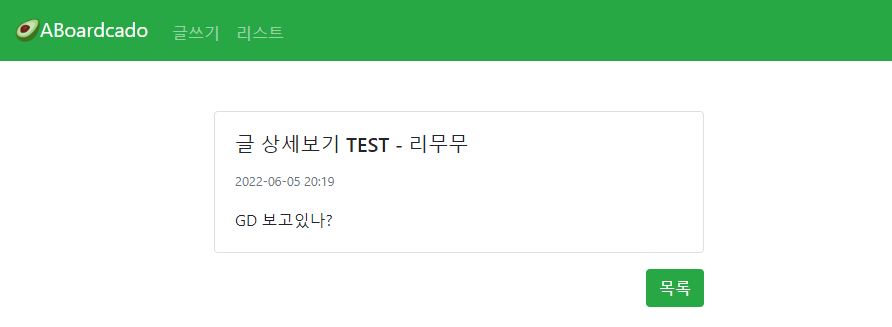
6번 글을 클릭하면
글 상세 내용이 잘 보인다 후후 👍
아래 목록 버튼을 클릭하면 다시 List로 넘어간다
숑💨
게시판 CRUD는 이제 수정과 삭제만 남았다!!
이후에 로그인 기능까지 갈라면 바쁘다
#다음편 빨리가자
'Project > 🥑JPA + SpringSecurity 게시판' 카테고리의 다른 글
| [JPA + SpringSecurity 게시판] #9 글 삭제하기 (0) | 2022.05.18 |
|---|---|
| [JPA + SpringSecurity 게시판] #8 글 수정하기 (0) | 2022.05.10 |
| [JPA + SpringSecurity 게시판] #6 글 리스트 만들기 (0) | 2022.04.24 |
| [JPA + SpringSecurity 게시판] #5 @Valid 유효성 체크하기 (0) | 2022.04.19 |
| [JPA + SpringSecurity 게시판] #4 글쓰기 만들기 (0) | 2022.04.12 |


