짝짝짝 👏
이전글에서 🥑 CRUD 🥑 를 모두 완성했다!
이제 좀 더 게시판스러움을 더하기 위해
JPA의 Pageable을 이용한 아주 간단한 페이징을 추가해보자
JPA의 ‘Pageable’로 페이징 기능을 구현해보자
Pageable은 JpaRepository를 상속했을 때 제공되는 페이징 기능
Pageable 보기
public interface Pageable {

	/**
	 * Returns a {@link Pageable} instance representing no pagination setup.
	 *
	 * @return
	 */
	static Pageable unpaged() {
		return Unpaged.INSTANCE;
	}

	/**
	 * Creates a new {@link Pageable} for the first page (page number {@code 0}) given {@code pageSize} .
	 *
	 * @param pageSize the size of the page to be returned, must be greater than 0.
	 * @return a new {@link Pageable}.
	 * @since 2.5
	 */
	static Pageable ofSize(int pageSize) {
		return PageRequest.of(0, pageSize);
	}

	/**
	 * Returns whether the current {@link Pageable} contains pagination information.
	 *
	 * @return
	 */
	default boolean isPaged() {
		return true;
	}

	/**
	 * Returns whether the current {@link Pageable} does not contain pagination information.
	 *
	 * @return
	 */
	default boolean isUnpaged() {
		return !isPaged();
	}

	/**
	 * Returns the page to be returned.
	 *
	 * @return the page to be returned.
	 */
	int getPageNumber();

	/**
	 * Returns the number of items to be returned.
	 *
	 * @return the number of items of that page
	 */
	int getPageSize();

	/**
	 * Returns the offset to be taken according to the underlying page and page size.
	 *
	 * @return the offset to be taken
	 */
	long getOffset();

	/**
	 * Returns the sorting parameters.
	 *
	 * @return
	 */
	Sort getSort();

	/**
	 * Returns the current {@link Sort} or the given one if the current one is unsorted.
	 *
	 * @param sort must not be {@literal null}.
	 * @return
	 */
	default Sort getSortOr(Sort sort) {

		Assert.notNull(sort, "Fallback Sort must not be null!");

		return getSort().isSorted() ? getSort() : sort;
	}

	/**
	 * Returns the {@link Pageable} requesting the next {@link Page}.
	 *
	 * @return
	 */
	Pageable next();

	/**
	 * Returns the previous {@link Pageable} or the first {@link Pageable} if the current one already is the first one.
	 *
	 * @return
	 */
	Pageable previousOrFirst();

	/**
	 * Returns the {@link Pageable} requesting the first page.
	 *
	 * @return
	 */
	Pageable first();

	/**
	 * Creates a new {@link Pageable} with {@code pageNumber} applied.
	 *
	 * @param pageNumber
	 * @return a new {@link PageRequest}.
	 * @since 2.5
	 */
	Pageable withPage(int pageNumber);

	/**
	 * Returns whether there's a previous {@link Pageable} we can access from the current one. Will return
	 * {@literal false} in case the current {@link Pageable} already refers to the first page.
	 *
	 * @return
	 */
	boolean hasPrevious();

	/**
	 * Returns an {@link Optional} so that it can easily be mapped on.
	 *
	 * @return
	 */
	default Optional<Pageable> toOptional() {
		return isUnpaged() ? Optional.empty() : Optional.of(this);
	}

}
- 인터페이스 구현체를 보면 다양한 기능이 제공되는데
- 현재 페이지, 전체 페이지, 정렬
- ABoardcado는
intgetPageNumber(); - 현재 페이지 번호를 기준으로 구현했다. 다양한 기능만큼 다양한 방법으로 구현할 수 있는데 최대한 쉽게 가보자
- 그리고 앞, 뒤 버튼 사용을 결정하는 맨 앞, 뒤 페이지를 체크할 수 있는 요소 등이 보인다
- Pageable을 이용할 경우 Page<board> 로 반환 받게되는데 이는 Repository를 통해 받는 Page<Entity>로
- Page 타입은 직접 사용할 수 없어서 List 로 변환하여야한다 ❗
- Controller에서 Pageable 객체에 쿼리 파라미터를 바인딩해 실행 http://localhost:8088/?page=0
코딩시작 👩🏻💻
기존 class에 아래 코드를 수정, 추가
1. Service
✅ 페이징 구현을 위해 List 메소드() 수정
[ BoardService ]
- getBoardList() 기존 코드@Transactional
public List<Board> getBoardList() {
List<Board> boardList = boardRepository.findAll(Sort.by(Sort.Direction.DESC, "id", "createdDate"));
return boardList;⬇️
[ BoardService ]
- getBoardList() 수정@Transactional(readOnly=true)
public List<BoardDto> getBoardList(Pageable pageable) {
Page<Board> boards = boardRepository.findAll(pageable);
List<Board> boardList = new ArrayList<>();
for (Board board : boards) {
boardList.add(board);
}
return boardList;
}
✅ Pageable

- JPA Repository를 상속하여 Pageable 이용
- JPA의 반환타입중 하나
- List<Board>가 아닌 Page<Board>로 받음
- 1,2,3페이지처럼 페이지 당 글 갯수를 정하면 페이지를 나누어 반환해줌
- 위 사진은 bootstrap까지 결합한 것 (아래 설명)
- List<Board>가 아닌 Page<Board>로 받음
2. Controller
Controller의 파라미터에 Pageable객체 설정
요청이 왔을 때 내부적으로 resolver가 동작해 Pageable에 쿼리 파라미터를 넣어 실행
- http://localhost:8088/?page=0
view인 Thymeleaf 에서도 계산식을 적용할 수 있고
Page<>를 불러 쓰는 방식도 있지만
- th:href="@{/(page=${boardList.pageable.pageNumber -1})}"
웬만하면 사용할 값만 서버단에서 완성된 값으로 넘기려고 Model에 담았다
[ BoardController ]- “/” List 매핑부분 변경❗ 추가아님❗
private final BoardRepository boardRepository;

@GetMapping("/")
public String boardList(@PageableDefault(page = 0, size = 5, sort = "id", direction = Sort.Direction.DESC) Pageable pageable, Model model) {

        Page<Board> boards = boardRepository.findAll(pageable);
        List<Board> boardList = boardService.getBoardList(pageable);

        int nowPage = boards.getPageable().getPageNumber()+1;
        int startPage = Math.max(nowPage-4,1);
        int endPage = Math.min(nowPage+5, boards.getTotalPages());
        int totalPages = boards.getTotalPages();

        model.addAttribute("boardList", boardList);
        model.addAttribute("nowPage", nowPage);
        model.addAttribute("startPage", startPage);
        model.addAttribute("endPage", endPage);
        model.addAttribute("totalPages", totalPages);

        return "board/list";
}
✅ @PageableDefault Pageable 기본 값 설정 (controller 단위)
- http://localhost:8088/?page=0 쿼리 파라미터를 넘기지 않았을 때 실행될 기본 값
- page : 불러올 페이지 번호
- size : 한 페이지 당 불러올 게시글 수
- sort : 정렬 기준
- direction : 정렬 방향
✅ getPageable() 객체 인자 사용
- getPageNumber() : 현재 페이지 번호 ( 0부터 시작하기 때문에 +1 )
- getTotalPages : 총 페이지 수
✅ startPage 블럭에서 보여줄 시작 페이지
- 음수가 되지 않도록 Math.max 설정
✅ endPage 블럭에서 보여줄 마지막 페이지
- 총 게시글 페이지를 초과하지 않도록 Math.min 총 페이지 설정
3. list.html
[ list.html ] - </table> 아래 추가
<div class="page">
		<ul class="pagination justify-content-center pagination-green" >

			  <!-- 이전 페이지 버튼 -->
			  <li class="page-item" th:classappend="${1 == nowPage }? 'disabled'">
			      <a th:href="@{/(page=${nowPage -2})}" class="page-link">Prev</a>
			  </li>

			  <!-- 현재 페이지 및 블럭 -->
			  <li class="page-item" th:classappend="${page == nowPage }? 'active'" th:each="page : ${#numbers.sequence(startPage, endPage)}">
			      <a th:if="${page!=0}" a th:href="@{/(page=${page-1})}" class="page-link" th:text="${page}" >1</a>
			      </a>
			  </li>

			  <!-- 다음 페이지 버튼-->
			  <li class="page-item" th:classappend="${totalPages == nowPage }? 'disabled'">
			      <a th:href="@{/(page=${nowPage})}" class="page-link">Next</a>
			  </li>

		</ul>
</div>
✅ Bootstrap 의 < Pagination >
ul class 이름 <ul class=”pagination”>
li class 이름 <li class=”page-item”>
a class 이름 <a class=”page-link”> 으로 지정하면
Bootstrap에서 제공하는 페이징 툴이 그려진다
추가로 class에 ‘active’, ‘disabled’ 를 추가하면 강조와 비활성화 가능
th:classappend="${1 == nowPage }? 'disabled'"
✅ th:classappend
- th는 thymeleaf 문법. class에 이름을 추가할 수 있는 기능
✅ nowPage
getPageable().getPageNumber
Controller에서 Pageable의 기능으로 현재 페이지를 model에 담아 보낸 값
✅ { 조건 } ? True value
thymeleaf 조건식. True 일때 True value 실행
✅ ${1 == nowPage }? 'disabled'
- nowPage가 1이면, 즉 1페이지라면 [ Prev ] 이전 페이지 버튼 비활성화
- class 이름에 ‘disable’을 추가하면 비활성화 ( Bootstrap )
✅ ${page == nowPage }? 'active'
- page값이 nowPage이면, 즉 페이지 블록 넘버 중 현재 페이지 버튼은 ‘active’
- class 이름에 ‘active’를 추가하면 배경 컬러 활성화 ( Bootstrap )
th:each="page : ${#numbers.sequence(startPage, endPage)}"
✅ th:each = “page”
th는 thymeleaf 문법 표시. each는 for문을 돌려 배열을 생성
- 위 코드의 배열명은 page
- ${page} 로 사용
✅ ${#numbers.sequence(startPage, endPage)}
- Thymeleaf의 Utility. 시퀀스 증가 반복 처리
- ${#numbers.sequence( from, to, step )}
- from : 증가 시작 점
- startPage - Controller Model에 담은 블럭에서 보여줄 시작 페이지
- to : 증가 종료 점
- endPage - Controller Model에 담은 블럭에서 보여줄 마지막 페이지
- step : 한 번에 증가할 양 ( default = 1 , 생략가능 )
- from : 증가 시작 점
th:href= 타임리프 주소 이동
✅ @{ /주소 }
- 기본적으로 특정 URL주소나 서버내 리소스 경로
✅ @{ /주소 (파라미터=${호출 할 서버 파라미터}) }
- 파라미터 값을 주소에 추가할 때 → "@{/ (page=${nowPage}) }"
✅"@{/(page=${nowPage - 2})}"> Prev
- 이전 페이지로 이동하는 [ Prev ] 버튼
- nowPage- 1 이 아닌 이유
- 이전 페이지라면 nowPage - 1이 맞다고 생각되지만
- nowPage는 페이지네이션 버튼 넘버 기준이고
- Pageable은 0부터 시작이기 때문에
- 쿼리 파라미터 값 ?page=0 일때 1페이지
- 페이지 클릭 블록이 [ 0 1 2 3 ]으로 시작하면 이상하자나,, 🥴
✅"@{/(page=${page-1})} th:text="${page}"> 1
- 클릭한 해당 페이지로 이동하는 [ 페이지 넘버 ] 버튼
- nowPage를 사용하지 않은 이유
- 현재 페이지는 ${#numbers.sequence(startPage, endPage)}로 생성
- nowPage값이 없는 페이지까지 증가하게됏다,,,ㅠㅠ
- 현재 페이지는 ${#numbers.sequence(startPage, endPage)}로 생성
- page - 1 을 하는 이유
- Prev 페이지에서 -2 한 이유와 동일 = 쿼리 파라미터값이 1 더 작기때문
🙊
WoW! 완성
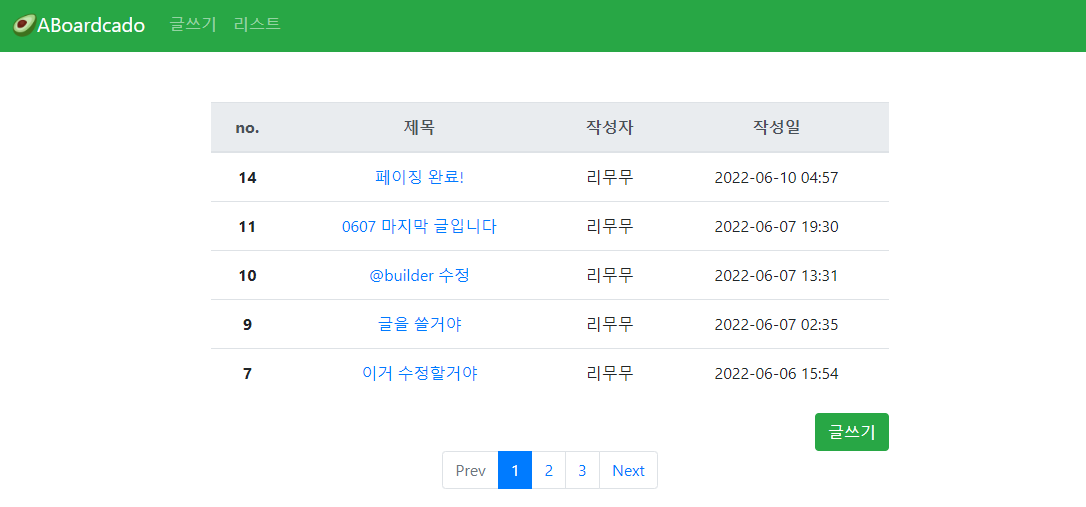
5일이 걸렸던 Paging
누가보면 웃을지 몰라도 JPA를 공부함에 있어 값진 시간이였다 GOOD!!
다음편에선 🔍검색기능을 추가하겠다!
'Project > 🥑JPA + SpringSecurity 게시판' 카테고리의 다른 글
| [JPA + SpringSecurity 게시판] #12 Spring Security 회원가입 (0) | 2022.06.21 |
|---|---|
| [JPA + SpringSecurity 게시판] #11 JPA 검색 만들기 (0) | 2022.06.13 |
| [JPA + SpringSecurity 게시판] #9 글 삭제하기 (0) | 2022.05.18 |
| [JPA + SpringSecurity 게시판] #8 글 수정하기 (0) | 2022.05.10 |
| [JPA + SpringSecurity 게시판] #7 글 상세보기 (0) | 2022.05.02 |


