Q . 학번을 클릭하면 수강중인 강의테이블로 넘기기
테이블 student2 와 lecture를 inner join 사용하여 합친다
[ 구성 파일 ]
HashMap은 <key, value>로 주소마다 값을 저장하고 가지고 있기 때문에 DataBean을 필요로 하지 않는다
1. student2.sql
2. lecture.sql
3. DBBean.java _(class)
4. List.jsp
5. resultList.jsp
1. student2.sql
create table student2(
stuno varchar2(20) primary key,
name varchar2(20),
major varchar2(20)
);

insert into student2 values('2021001','홍길동','컴퓨터공학과');
insert into student2 values('2021102','박길동','전자공학과');
insert into student2 values('2021003','고길동','컴퓨터공학과');
insert into student2 values('2021103','오길동','산업공학과');
2. lecture.sql
create table lecture(
stuno varchar2(20),
code varchar2(20),
subject varchar2(40),
professor varchar2(20),
CONSTRAINT test_pk primary key(stuno,code)
);

insert into lecture values('2021001','S01','소프트웨어 공학','정프로');
insert into lecture values('2021001','S02','자료구조','박자료');
insert into lecture values('2021003','S01','소프트웨어 공학','정프로');
insert into lecture values('2021003','S04','알고리즘','김길동');
insert into lecture values('2021103','S05','산업디자인','이디자');
3. DBBean.java
package thuman.model;

import java.sql.Connection;
import java.sql.PreparedStatement;
import java.sql.ResultSet;
import java.util.ArrayList;
import java.util.HashMap;
import java.util.List;

import javax.naming.Context;
import javax.naming.InitialContext;
import javax.sql.DataSource;

public class DBBean {
	private static DBBean instance=new DBBean();
	public static DBBean getInstance() {
		return instance;
	}
	private Connection getConnection() throws Exception {
		Connection conn=null;
		Context ctx=new InitialContext();
		Context envCtx=(Context) ctx.lookup("java:comp/env");
		DataSource ds= (DataSource) envCtx.lookup("jdbc/basicjsp");
		conn=ds.getConnection();
		return conn;
	}

	public List<HashMap<String,Object>> listMember(){

		List<HashMap<String, Object>> list=null;
		Connection conn=null;
		PreparedStatement pstmt=null;
		ResultSet rs=null;

		try {
			conn=getConnection();
			String sql="select * from student2";
			pstmt=conn.prepareStatement(sql);
			System.out.println("SQL문제없음");
			rs=pstmt.executeQuery();
			list=new ArrayList<HashMap<String,Object>>();
			while(rs.next()) {

				HashMap<String, Object> map=new HashMap<String, Object>();

				map.put("stuno",rs.getString(1));
				map.put("name",rs.getString(2));
				map.put("major",rs.getString(3));

				list.add(map);
			}
		}catch(Exception e) {
			e.printStackTrace();
		}finally {
			if(rs!=null) try{rs.close();}catch(Exception e) {}
			if(pstmt!=null) try{pstmt.clearParameters();}catch(Exception e) {}
			if(conn!=null)try {conn.close();}catch(Exception e) {}
		}
		return list;
	}

	public List<HashMap<String, Object>> listMemberResult(String stuno){
		List<HashMap<String, Object>> list=null;
		Connection conn=null;
		PreparedStatement pstmt=null;
		ResultSet rs=null;

		try {
			conn=getConnection();
			String sql="select s.stuno,s.name,s.major,L.code,L.subject,L.professor from student2 S,lecture L where s.stuno=L.stuno and s.stuno=?";
			pstmt=conn.prepareStatement(sql);
			pstmt.setString(1, stuno);
			System.out.println("SQL문제없음");
			rs=pstmt.executeQuery();
			list=new ArrayList<HashMap<String,Object>>();


			while(rs.next()) {

				HashMap<String, Object> map=new HashMap<String, Object>();

				map.put("stuno",rs.getString(1));
				map.put("name",rs.getString(2));
				map.put("major",rs.getString(3));

				map.put("code",rs.getString(4));
				map.put("subject",rs.getString(5));
				map.put("professor",rs.getString(6));
				list.add(map);
			}
		}catch(Exception e) {
			e.printStackTrace();
		}finally {
			if(rs!=null) try{rs.close();}catch(Exception e) {}
			if(pstmt!=null) try{pstmt.clearParameters();}catch(Exception e) {}
			if(conn!=null)try {conn.close();}catch(Exception e) {}
		}
		return list;
	}
}
4. List.jsp
<%@page import="java.util.HashMap"%>
<%@page import="java.util.Map"%>
<%@page import="java.util.List"%>
<%@page import="thuman.model.DBBean"%>
<%@ page language="java" contentType="text/html; charset=UTF-8"
	pageEncoding="UTF-8"%>
<%
DBBean dbBean = DBBean.getInstance();
List<HashMap<String, Object>> list = dbBean.listMember();
%>
<!DOCTYPE html>
<html>
<head>
<meta charset="UTF-8">
<title>리스트 출력</title>
</head>
<body>

	<table border="1">
		<tr>
			<th>학번</th>
			<th>이름</th>
			<th>전공</th>
		</tr>
		<%
		for (int i = 0; i < list.size(); i++) {
		%>
		<tr>
			<td> <a href="resultlist.jsp?stuno=<%=list.get(i).get("stuno")%>&name=<%=list.get(i).get("name")%>&major=<%=list.get(i).get("major")%>">
			<%=list.get(i).get("stuno")%>
			</a> </td>
			<td><%=list.get(i).get("name")%></td>
			<td><%=list.get(i).get("major")%></td>
		</tr>
		<%
		}
		%>
	</table>
</body>
</html>
"stuno" 학번 항목에 a링크를 걸어 resultList로 넘어가 표가 출력되게 하였다
5. resultList
<%@page import="java.util.HashMap"%>
<%@page import="java.util.Map"%>
<%@page import="java.util.List"%>
<%@page import="thuman.model.DBBean"%>
<%@ page language="java" contentType="text/html; charset=UTF-8"
	pageEncoding="UTF-8"%>
<%
DBBean dbBean = DBBean.getInstance();
String stuno = request.getParameter("stuno");
String name=request.getParameter("name");
String major=request.getParameter("major");
List<HashMap<String, Object>> list = dbBean.listMemberResult(stuno);
%>
<!DOCTYPE html>
<html>
<head>
<meta charset="UTF-8">
<title>리스트 출력</title>
</head>
<body>
	<table border="1">
		<tr>
			<th>학번</th>
			<th>이름</th>
			<th>전공</th>
		</tr>

		<tr>
			<td><%=stuno%></td>
			<td><%=name%></td>
			<td><%=major%></td>
		</tr>

	</table>
	<br>
	<br>

	<table border="1">
		<tr>
			<th>수강과목코드</th>
			<th>수강과목명</th>
			<th>담당교수</th>
		</tr>
		<%
		if (list.size() < 1) { // 수강을 하는 사람이 없을 때 list의 개수는 없기 때문에..
		%>
		<tr><td colspan="3">수강하는 과목이 없습니다.</td></tr>
		<%
		} else
		for (int i = 0; i < list.size(); i++) {
		%>
		<tr>
			<td><%=list.get(i).get("code")%></td>
			<td><%=list.get(i).get("subject")%></td>
			<td><%=list.get(i).get("professor")%></td>
		</tr>
		<%
		}
		%>
	</table>
</body>
</html>
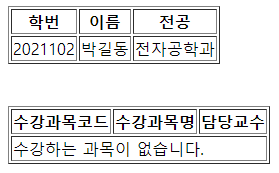
결과:)

'DEV Heart' 카테고리의 다른 글
| [ MVC 1 게시판 ] #2 글쓰기 (WriteForm) (0) | 2021.09.08 |
|---|---|
| [ MVC 1 게시판 ] #1 DB연동 (JavaBean) (0) | 2021.09.08 |
| [ HashMap ] #2 HashMap으로 Sql table 출력하기 (0) | 2021.08.31 |
| [ HashMap ] #1 <Key, Value> put, get 사용법 (0) | 2021.08.31 |
| [ MVC 1 ] 자바DBBean을 이용한 DB연동부터 List 출력 (0) | 2021.08.17 |
